

.svg)





Grow Your Organic Traffic
10× Faster on Autopilot
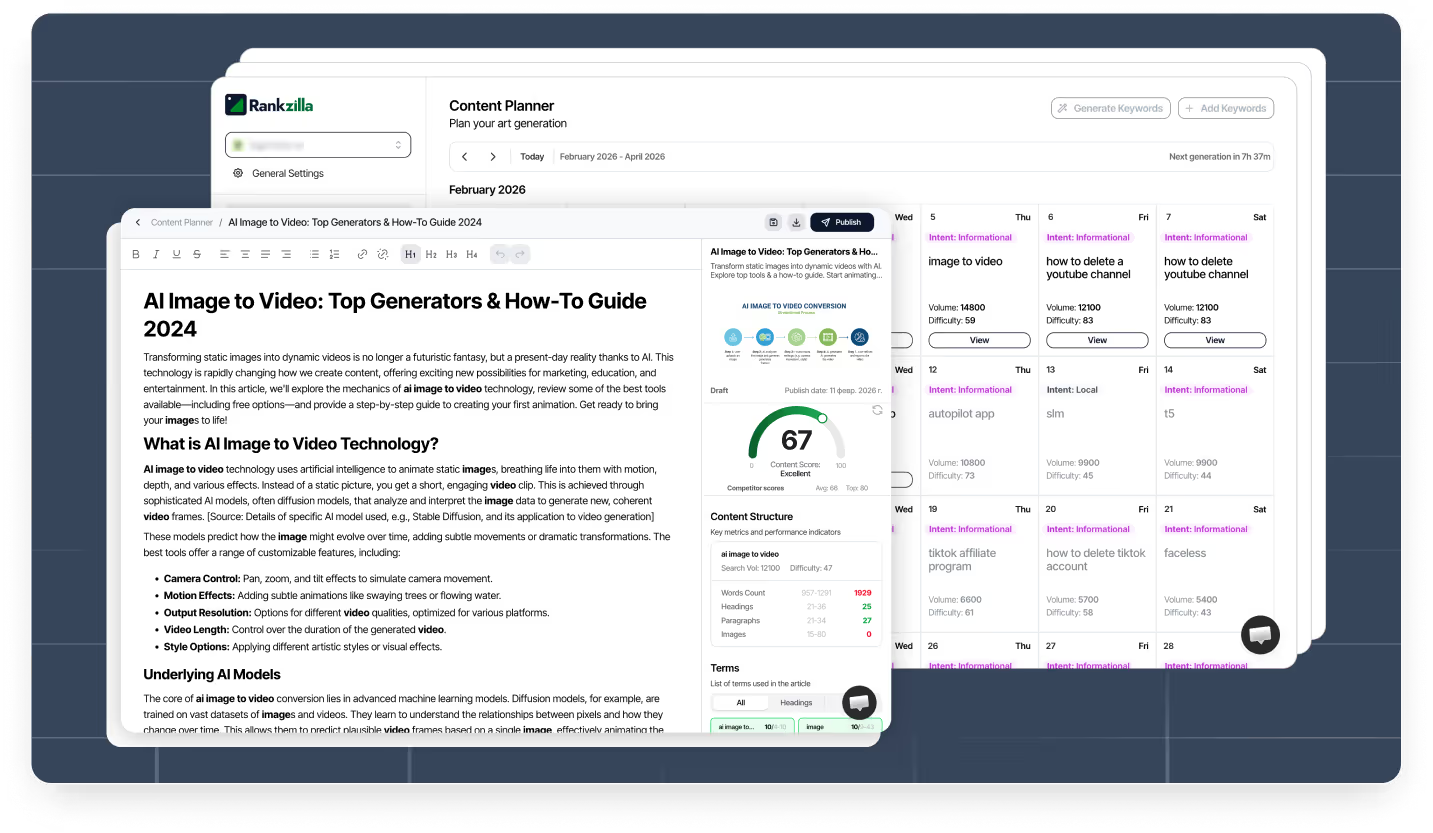
Rankzilla.ai researches keywords, writes fully optimized articles, publishes them to your site, and improves your rankings 24/7 — automatically.


Our Solution
You shouldn’t waste hours writing or pay agencies thousands just to grow. Forget juggling a dozen SEO tools. Our AI Agent does the work for you—driving traffic and revenue even while you sleep.
Manual Grind & Expensive Agencies


Automated AI Growth Engine
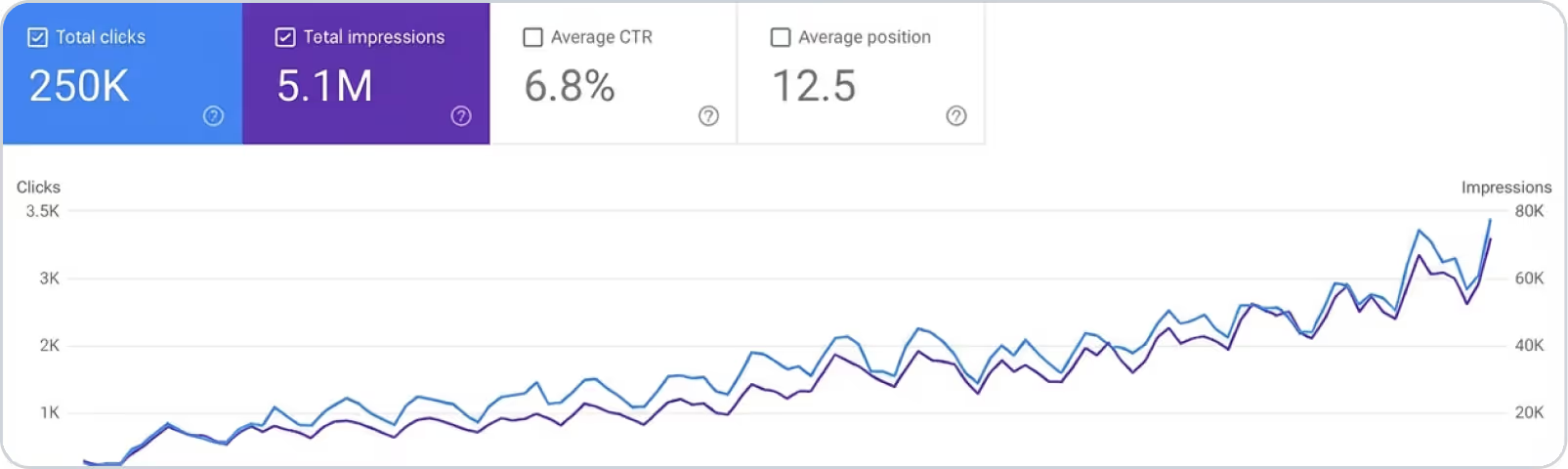

Your Entire SEO Workflow — Automated by AI
🔮 How the magic actually works
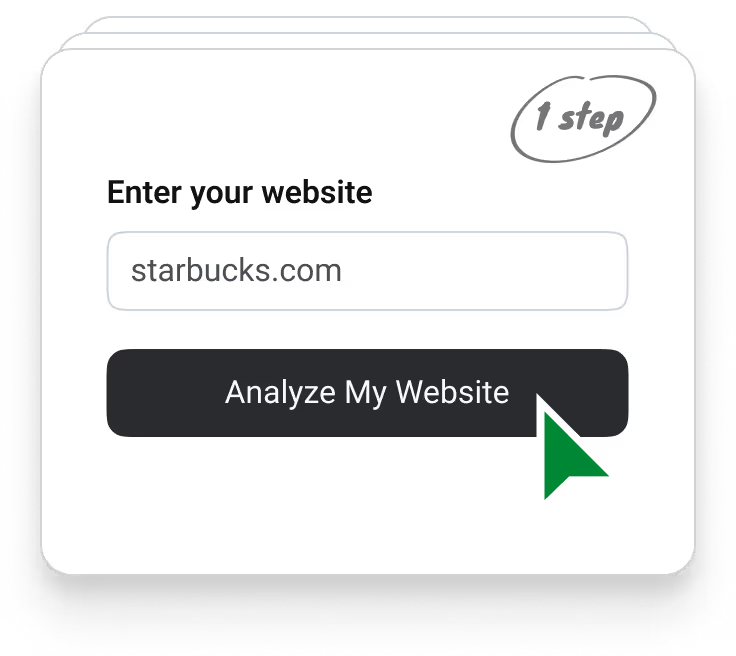
🔍 Deep analysis of your business
.avif)
🗓 Get a powerful 30-day plan
.avif)
⚙️ Generate articles on autopilot
.avif)
🔧 Publish articles automatically
.avif)
Why Rankzilla?
SEO is no longer only about Google.


We make sure you show up in all of them and unlock new growth opportunities, get more visitors and customers, and achieve compound growth over time.

Write in your language

Auto Images

Edit article with AI
24/7 Support
Auto Promotion
AI Generate unlimited keywords
AI-crafted content that feels natural, human, and engaging.
These samples were generated by Rankzilla.

Best Free Video Recording Software in 2025

How to Make a TikTok Go Viral: The Ultimate Guide

Strong Topics to Write an Argumentative Essay On
Best Free Video Recording Software in 2025
Whether you’re a YouTuber, a business owner, a student, or just someone who likes capturing and sharing moments, having reliable and feature-rich video recording software can make a big difference.
With all the different options out there, trying to find the best free video recording and editing software that suits your needs can be a real headache. But no need to worry! In this article, we’ll look at some of the best free video recording programs out there. We’ll take a closer look at their features and see which ones are best for your specific use case.
Before we get into the nitty-gritty, let’s figure out why free video recording software is so valuable.
First and foremost, it’s accessible. Not everyone can afford expensive video editing software, so free options allow individuals and businesses with limited budgets to produce high-quality video content.
Also, free video recording tools are great for beginners in the world of video creation. They help you get started with no significant financial investment. You can find out whether video creation is even your thing without breaking the bank — and that’s always a huge plus.
Do bear in mind that some of the software options mentioned in this list only offer a free trial period. After that, you’ll need to either switch to a different tool or upgrade. Other programs include dedicated free plans alongside paid plans that you might want to explore if the free option impresses you.
In a nutshell, it’s practically impossible to find 100% free video recording software with no limitations. However, there are plenty of ways to access most useful features even if you’re on a tight budget.

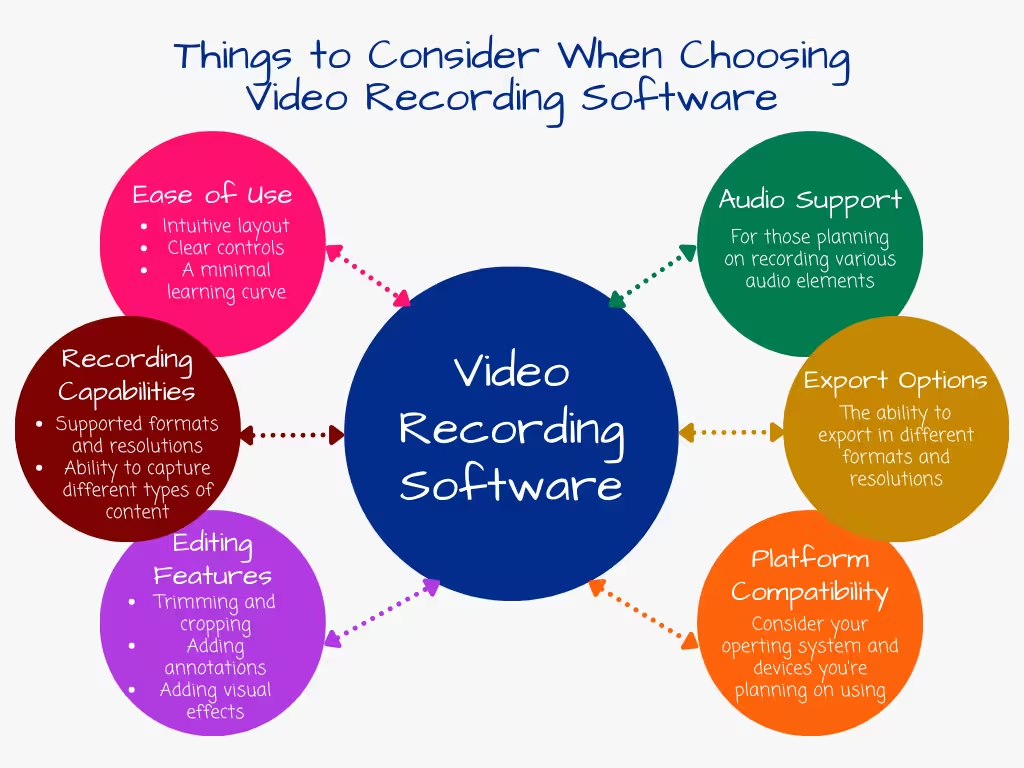
While the “free” aspect is undoubtedly attractive, there are several key factors you should consider before choosing a video recording program.
Ease of Use
A user-friendly interface is essential, especially for beginners. Look for software with an intuitive layout, clear controls, and a minimal learning curve.
Recording Capabilities
Check whether the software can capture different types of content, such as screen recordings, webcam footage, and external video sources. It’s also important to review supported formats and resolutions.
Editing Features
Many free video recording tools offer basic editing options like trimming, splicing, annotations, and simple visual effects, which can be enough for everyday needs.
Audio Support
If you plan to record voiceovers or system audio, make sure the software supports audio recording and provides basic audio editing and mixing options.
Export Options
Being able to export videos in multiple formats and resolutions is crucial if you want to share content across different platforms and devices.
Platform Compatibility
Ensure the software works on your operating system (Windows, macOS, Linux) and devices. Otherwise, you may end up wasting time installing incompatible tools.
Now that we’ve covered the key considerations, let’s take a closer look at some of the best free video recording software available in 2025.
If you’re a Mac user looking for a powerful video recording and editing solution, Screen Story is worth checking out. This software combines screen recording with advanced editing features, allowing you to create professional-quality videos with minimal effort.
All features are available during the free trial period, though payment details are required before video rendering.
Screen Story stands out thanks to a range of unique features:
• Automatic zoom-ins that highlight important screen actions
• Smooth cursor movements for a more polished viewing experience
• Customizable backgrounds and window frames
• Selfie camera support with animated transitions
• Motion blur and cursor customization for more natural animations
With Screen Story, you can export videos and GIFs in formats such as MP4, GIF, and 4K resolution. The software also supports external monitors, microphones, and cameras for an enhanced recording setup.
Screen Story’s intuitive interface and polished visuals make it a great choice for entrepreneurs, designers, marketers, developers, and educators. It’s ideal for product demos, tutorials, and engaging social media content.
If you're looking for a great open-source solution for gaming, content creation, or live streaming, check out OBS Studio. This software was developed by a dedicated community of volunteers, and it has all the features you need to capture gameplay footage and live stream on Twitch and YouTube.
In this comprehensive review, we're going to take a deep dive into what OBS Studio can do, and we'll also discuss its strengths, weaknesses, and overall user experience. By the way, this is the only option from our list that is completely free and that doesn’t have any paid plans.
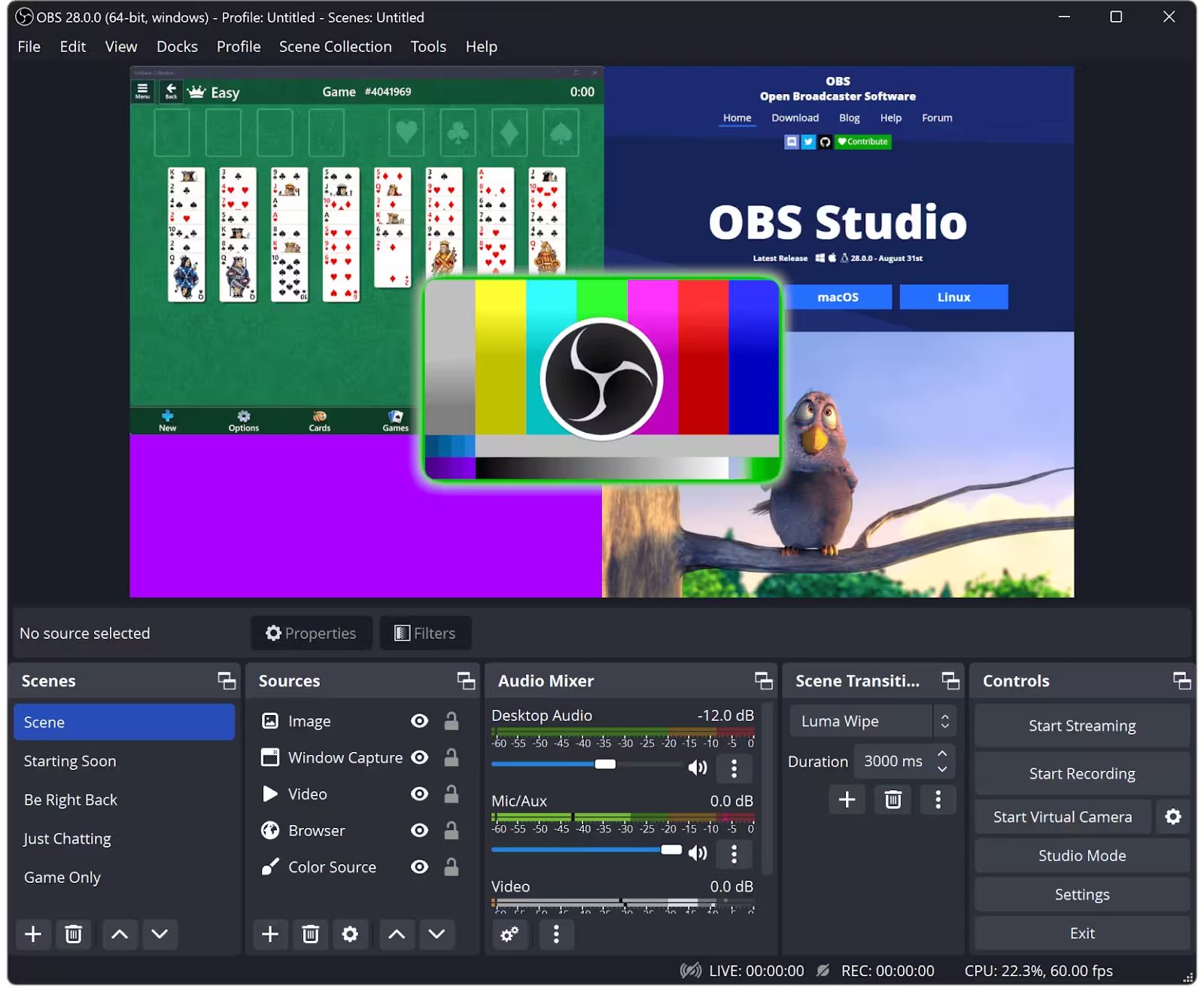
One of the best things about this video capture freeware is its wide range of features. At the heart of the system, users can capture everything on their screen, along with webcam footage and audio. However, that’s not all — OBS Studio also offers a wide selection of advanced options.
These include:
Customizable Scenes and Sources
OBS Studio’s main strength lies in its ability to create custom scenes that combine multiple elements, such as game windows, webcams, images, videos, and even browser sources. Users can easily switch between scenes, making transitions during live streams or recorded sessions smooth and seamless.
Audio Mixer
One of the software’s standout features is its audio mixer, which allows users to manage multiple audio sources at the same time. This is especially useful for live streamers who need to balance game audio, microphone input, and background music.
Filters and Effects
OBS Studio includes a variety of filters and effects, such as chroma key (green screen), color correction, and noise suppression. These tools help improve visual and audio quality, allowing creators to produce professional-ready videos and streams.
User Experience: A Learning Curve
OBS Studio offers an impressive range of features, but its user experience can be challenging. While the interface is functional, it may feel overwhelming and cluttered for new users. Navigating the settings and configuration options can be daunting for those unfamiliar with the software.
That said, for users who are flexible and willing to invest time in learning, OBS Studio is nearly unbeatable in terms of customization and control. Once mastered, it becomes a powerful tool in the hands of experienced creators.
Performance and Compatibility
Another major advantage of OBS Studio is its lightweight design and broad compatibility. The software runs smoothly on a wide range of hardware, including older or less powerful systems, making it a great option for users on a limited budget.
OBS Studio supports multiple operating systems, including Windows, macOS, and Linux, ensuring accessibility for a wide audience.
Live Streaming Made Simple
OBS Studio excels at live streaming thanks to its seamless integration with platforms such as Twitch, YouTube, Facebook Live, and others. The ability to mix multiple sources, apply filters, and adjust audio levels in real time makes it invaluable for professional live streams.
However, while OBS Studio is excellent for streaming, its built-in video editing capabilities are limited. Users looking for advanced post-production tools may need additional software.
Community Support and Resources
OBS Studio benefits from an active and supportive community. Users can access forums, tutorials, and a wide range of user-created resources. Regular updates and ongoing development help keep the software modern and reliable.
Pros
• Extensive customization options
• Supports a wide range of sources (webcams, capture cards, etc.)
• Active community and abundant learning resources
• Cross-platform compatibility (Windows, macOS, Linux)
Cons
• Steep learning curve for beginners
• Potential performance issues on older or low-end systems
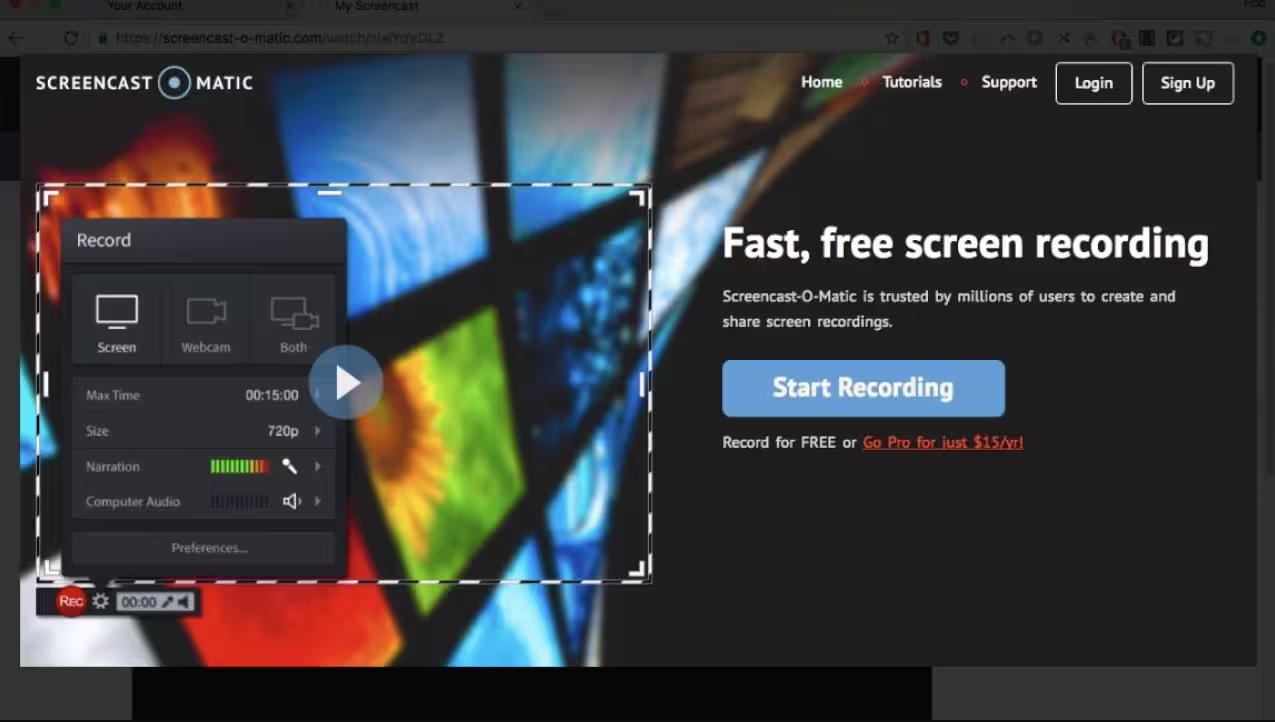
If you’re someone who isn’t ready to invest a lot of time in figuring out how to the get most out of OBS Studio, you might want to go for Screen-O-Matic (the software has been recently renamed to ScreenPal).
One of the best things about this software is that it's really easy to use. It is designed to be simple and easy to understand, so it can be used by people at all levels of skill. Whether you're a video expert or just getting started, recording and editing videos will be quick and straightforward for you.
Flexible Recording Options
Screencast-O-Matic offers a variety of recording options that let you capture screencasts, webcam footage, or a combination of both. The free video recorder allows you to record your entire screen, a specific application window, or the whole desktop. The software also supports multi-screen recording, making it suitable for a wide range of video recording needs.
High-Quality Recordings
Despite being free, Screencast-O-Matic delivers high-quality recordings. You can capture videos in resolutions up to 1080p, ensuring sharp and clear visuals. The software also supports audio recording, allowing you to narrate your videos or capture system audio for tutorials and demonstrations.
Comprehensive Editing Tools
Screencast-O-Matic includes a strong set of video editing features for free video recording software. The built-in editor allows you to trim, split, and merge video clips, add annotations, callouts, and shapes, and apply effects such as transitions, watermarks, and green screen effects. This makes it easy to polish videos without relying on additional editing tools.
Audio Editing
In addition to video editing, the software provides solid audio editing capabilities. You can record voiceovers, adjust audio levels, and add background music or sound effects. Support for multiple audio tracks allows you to mix and edit different audio sources within a single project.
Cloud Storage and Collaboration
Screencast-O-Matic offers free cloud storage for video projects, allowing you to access and share content from anywhere. Videos can be organized into channels, making it easier to manage and distribute content to specific audiences. The platform also supports real-time collaboration, enabling multiple users to work on the same project simultaneously.
Sharing and Publishing Options
Once your project is complete, Screencast-O-Matic provides multiple ways to share and publish your videos. You can export files in formats such as MP4, AVI, and FLV, or upload them directly to platforms like YouTube, Vimeo, and Google Drive. Videos can also be shared via email or generated links for social media distribution.
Compatibility and System Requirements
Screencast-O-Matic runs on both Windows and macOS and has relatively modest system requirements, making it accessible on most modern computers. Still, it’s recommended to review the official system requirements to ensure optimal performance.
Pricing and Plans
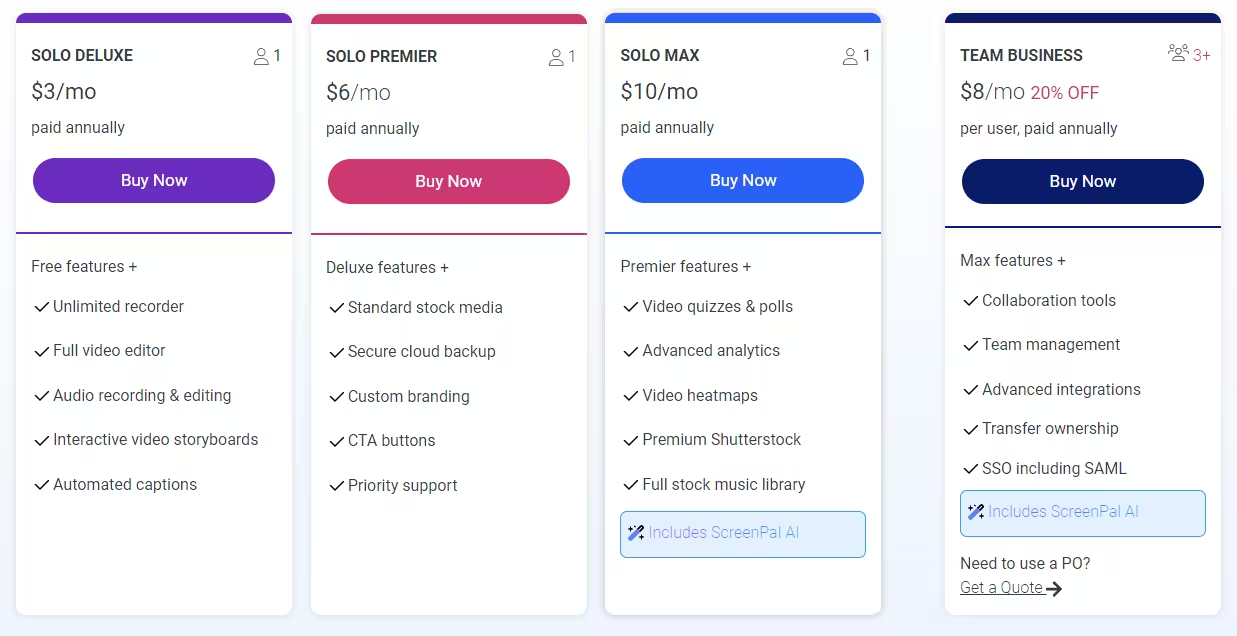
The free version of Screencast-O-Matic includes all the essential tools needed for basic video recording and editing. For users who want more advanced functionality, paid plans are available starting at $3 per month when billed annually. These plans include unlimited recording time, enhanced editing tools, access to a stock media library, and priority support, along with team and enterprise options.
Pros
• Intuitive and straightforward interface
• No watermarks or time limits for free users
• Simultaneous recording from multiple sources
• Extensive library of educational resources
Cons
• Limited advanced editing features in the free version
• No support for multi-track audio editing
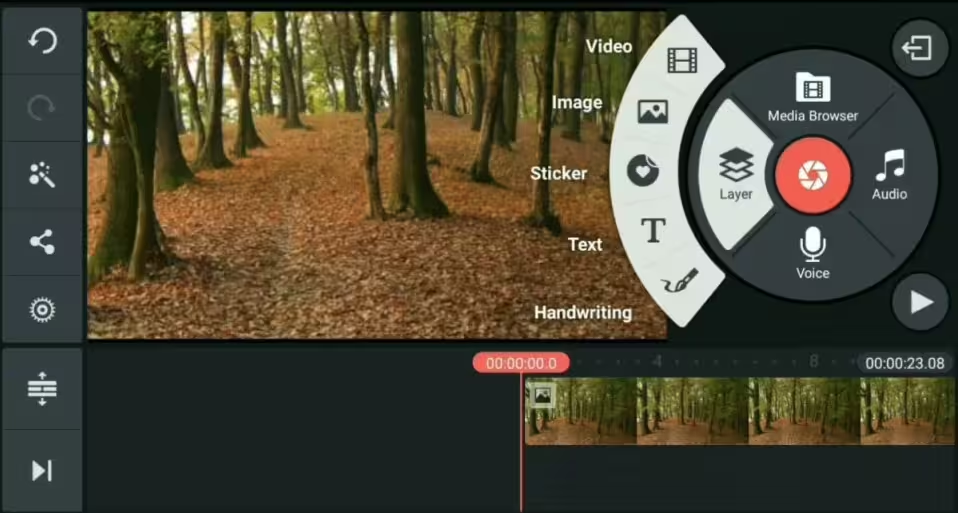
KineMaster was designed with mobile devices in mind but it’s become a lot more than that. It’s now a powerful video editing suite that can also record video. Its cross-platform availability and user-friendly interface make it a popular choice among content creators on the go.
KineMaster is different from other video capture program free because it offers all the features you need without a subscription or paid license. Unlike many free programs that have limited functionality or lots of ads, KineMaster's free version is easy to use with no ads. This makes it a great choice for anyone looking for a reliable video recording tool.
Intuitive Video Editing Capabilities
KineMaster is great for recording and saving footage, but its true strength lies in editing. With a simple, easy-to-use interface and a wide range of tools, you can quickly turn raw clips into polished, professional-looking videos. From trimming and cutting clips to adding titles, transitions, and special effects, this free video recorder provides everything you need to bring your creative vision to life.
Multi-Layer Editing
One of KineMaster’s standout features is its support for multi-layer editing, a capability typically found only in premium video editing suites. This allows users to blend multiple videos, overlays, and graphics seamlessly, enabling more complex compositions and advanced storytelling techniques.
Audio Editing and Enhancement
In addition to its video editing tools, KineMaster includes a comprehensive set of audio editing features. You can adjust audio levels, apply audio filters, and record voiceovers directly within the app. This eliminates the need for multiple applications and makes KineMaster a true all-in-one audio and video recording solution.
Cross-Platform Compatibility
KineMaster works seamlessly across devices and platforms. It’s available on both iOS and Android, allowing you to edit videos on your phone or tablet and maintain a consistent experience across operating systems. This makes it an excellent choice for creators who work on the go.
Mac Compatibility
Although there is no native macOS version of KineMaster, Mac users can still access the app through emulators or cloud-based solutions. This flexibility allows them to take advantage of KineMaster’s powerful recording and editing features without sacrificing functionality.
Community and Resources
Perhaps, one of the main reasons why this software to record video and audio has become such a success is because of its active and supportive community. Users get access to lots of tutorials, templates, and resources that other creators have shared, which makes it easy for them to learn and grow together. In addition to this, KineMaster’s developers are always listening to user feedback, which helps them make constant improvements to the app, ensuring a constantly evolving and improved experience for all users.
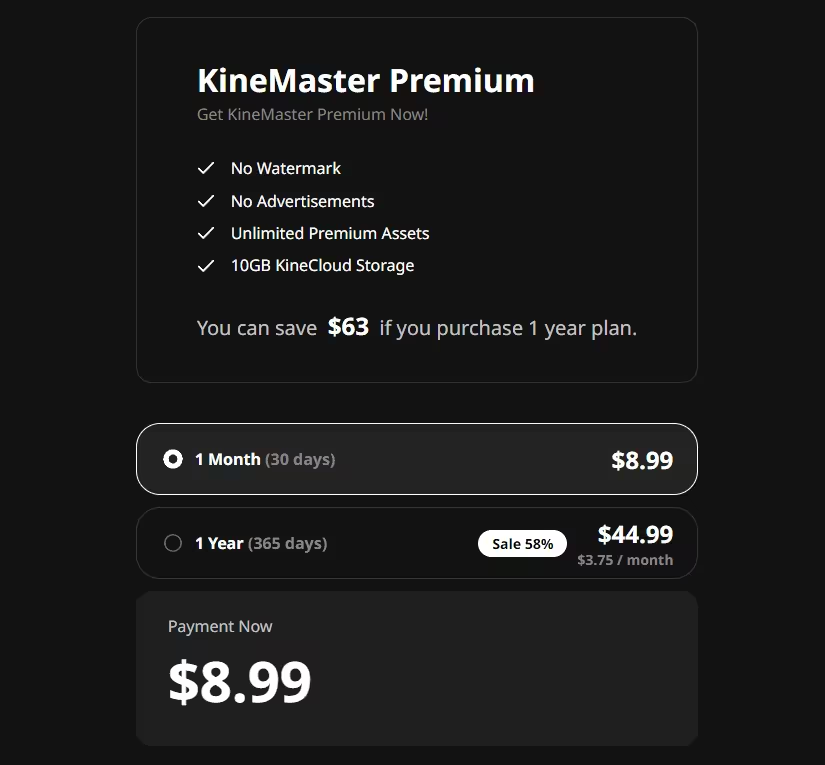
Paid Plans
Do bear in mind that the software really does have some amazing features in the free version. But, just as always, in order to be able to take advantage of all the available tools, you would be asked to pay a monthly subscription fee.
Pros
• Robust editing features for a mobile app
• Intuitive touch-based interface
• Cross-platform availability (Android, iOS, ChromeOS)
• Suitable for creating social media content
Cons
• Watermarks in the free version
• Limited export options and resolutions for free users
• Occasional performance issues on older devices
Lightstream Studio is a cloud-based live-streaming platform that makes creating content a breeze for creators of all levels. Unlike traditional video recording Mac free software that often requires a lot of setup and tweaking, Lightstream Studio runs right within your web browser, so you don't have to mess about with downloads or anything too resource-heavy.
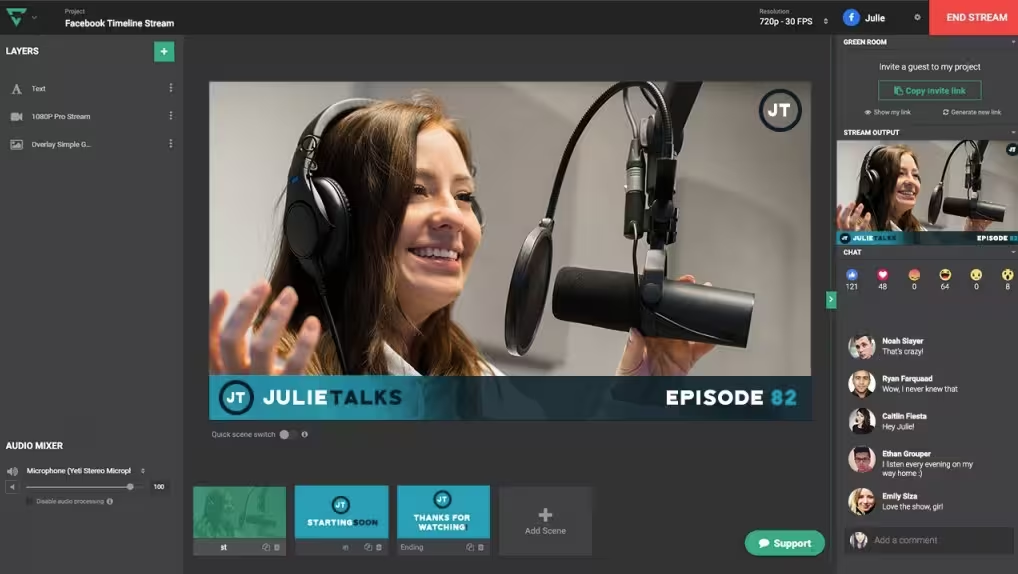
One of Lightstream Studio’s best features is its simple drag-and-drop interface. This makes it easy for users to add all kinds of elements to their live streams. From webcam feeds and artistic overlays to display captures and guest appearances, the streamlined approach makes it a breeze to get started with live streaming.
Free and Powerful
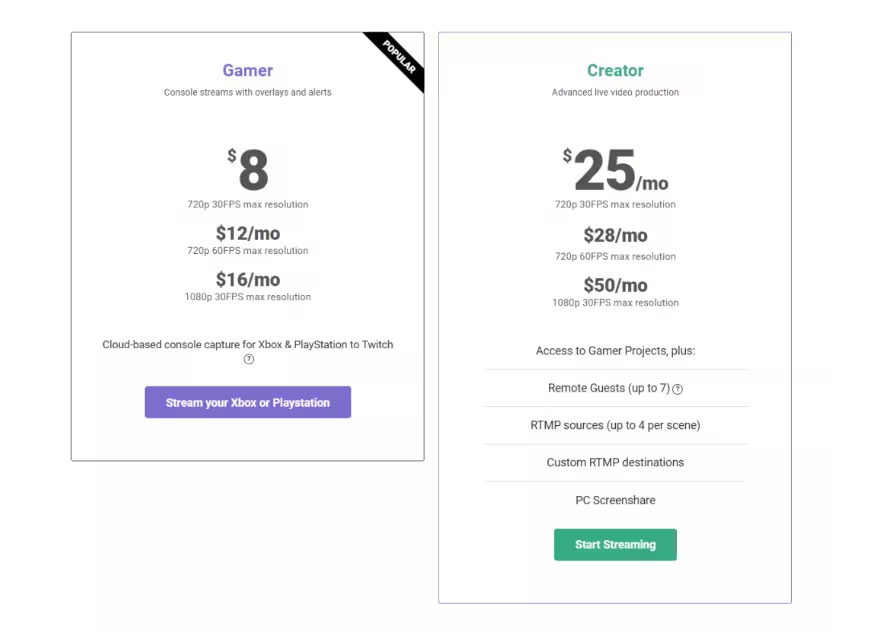
While Lightstream Studio offers a premium subscription option for all of those advanced features you could possibly need, its free video capture software is a true gem for those seeking a good feature-rich video recording and editing solution without breaking the bank. The free plan lets you record up to 3 hours of streaming time, with a maximum output resolution of 720p at 30 frames per second. This should be more than enough for any aspiring content creators out there to hone their skills and build a dedicated following.
Plethora of Possibilities
Lightstream Studio is pretty versatile, especially when it comes to live-streaming stuff. Whether you’re doing podcasts, interviews, or live product demos—or anything else—it gives you all the tools you need to keep your audience hooked and make your content better.
Collaborative Streaming & Easy Video Capture
Lightstream Studio really stands out with its ability to seamlessly integrate remote guests into your live streams. With the “Green Room” functionality, you can invite collaborators from anywhere in the world just by sharing a link. It makes it easy to host engaging panel discussions, interviews, or co-streaming sessions with this feature.
Reliable and Resilient
With so many people streaming live, connectivity issues can be a major pain. This free movie capture software keeps you in the clear, constantly monitoring your internet connection and automatically adjusting the bitrate so you can avoid buffering issues.
Plus, its auto-BRB feature is there for you if you experience a temporary disconnection. It keeps your stream going and lets your audience know you’re back online until you reconnect—a total game-changer for uninterrupted content delivery.
Cross-Platform Compatibility
No matter if you’re a Mac fan or a Windows whiz, this video capture freeware works great on all kinds of platforms. It’s got solid connections to platforms like Twitch, YouTube, Facebook, and custom RTMP destinations, so you can share your live streams with audiences on different channels. This helps you reach more people and grow your business.
Paid Plans
In case you ever find out that the free version is simply not enough for your needs, here are the prices of the different monthly subscription plans:
Pros
• No software installation or updates required
• Seamless collaboration and remote working capabilities• Intuitive and user-friendly interface
• Extensive online resources and tutorials
Cons
• Limited advanced editing features in the free plan
• Requires a stable internet connection for optimal performance
• Some features may be resource-intensive for older systems
Read Documentation and Tutorials
It’s true that even the most user-friendly software can have hidden features or shortcuts that can make your workflow easier. Spend a little time reading the documentation, watching the tutorials, and looking at the online resources for your chosen program record video so you know how to use it to its full potential.
Optimize Your System
Video recording can be pretty resource-intensive, especially when you’re working with high-resolution or high-frame-rate content. It’s a good idea to make sure that your computer meets the minimum system requirements for the software you’re using and to close down any other applications that you don’t need during the recording session to free up some system resources.
Experiment with Settings
Many free video recording programs let you tweak things like video quality, frame rate, and audio settings. Try different settings to see what works best for your specific use case — you might be surprised at what ended up working for you.
Take Advantage of Community Support
If you want the most up-to-date information on software, you can join the online forums. These are where users can share tips, troubleshoot issues, and learn from each other. So, it’s a great way to stay on top of the latest updates, features, and best practices. But that’s, of course, for those who are willing to go the extra mile.
.avif)
Want to reach millions of views and gain instant fame? Then you should definitely check out our tips and tricks on how to make TikTok videos go viral!
Let’s Take a Quick Look at TikTok's Algorithm
Before we get into how to make a TikTok go viral, we need to understand the platform's algorithm. Basically, the idea is that the platform's algorithm shows users content they're most likely to engage with based on their past interactions, viewing habits, and preferences.
The algorithm takes a number of things into account when deciding which videos to promote, including:
- User interactions (likes, comments, shares)
- Video information (captions, sounds, hashtags)
- Device and account settings (device type, location, and language preferences)
- Video completion rate (the number of completed video views divided by the total number of views)
Once you understand what makes the algorithm tick, you can tweak your content to fit the bill and create a viral video on TikTok.
How to Get Viral on TikTok: Key Strategies
1. Keep Up with Trends
One of the best ways to get your content seen by lots of people on TikTok is to make sure you're up to date with all the latest trends. TikTok moves pretty quickly, with new trends, challenges, and popular sounds coming up all the time. Getting involved in these can help you reach new audiences and get more eyes on your content.
To stay on top of trends:
- Regularly check the "Explore" page
- Pay attention to popular hashtags
- Follow influencers in your niche
- Use trending sounds and music in your videos

2. Create Engaging and Original Content
While it's good to follow trends, creating unique and engaging content is also really important. To get your TikTok to go viral, you need to stand out from the crowd, which means coming up with creative ideas, putting your own spin on existing trends, or introducing new concepts.
- Tell a story or share an interesting fact
- Use humor or emotional appeal
- Showcase your talents or skills
- Provide value through tutorials or informative content
3. Optimize Your Video's First Few Seconds
What type of videos go viral on TikTok? The ones that are able to capture the viewers’ attention within the first few seconds. The platform moves pretty fast, so most people make up their minds about whether or not they want to keep watching within about 3 to 5 seconds. So if you want your video to go viral, make sure you hook them in at the beginning.
To create a compelling hook:
- Ask an intriguing question
- Make a bold statement
- Start with a surprising fact or statistic
- Use visually appealing or unexpected imagery
4. Use Relevant Hashtags
One of the simplest tips to go viral on TikTok is to use relevant and trending hashtags. This can help your video get seen by more people. Just remember to mix in some popular hashtags with a few niche ones.
- Research popular hashtags in your niche
- Use a mix of broad and specific hashtags
- Limit your hashtags to 3-5 per video
- Create your own branded hashtag for consistent branding
5. Engage with Your Audience
Building a strong bond with your followers is crucial for gaining viral traction on TikTok. It's a two-way street. You have to create content that gets folks interacting, and you also have to engage with them actively when they interact with your content back.
- Respond to comments on your videos
- Participate in duets and collaborations
- Use interactive features like polls and questions
- Encourage viewers to share their thoughts or experiences
How to Go Viral on TikTok Without Followers
One of the things that makes TikTok special is that having lots of followers isn't the key to going viral. The platform's algorithm is set up to promote content that's high-quality and gets lots of engagement, regardless of who the creator is or how many followers they have. This means that even new users or those who aren't that well-known can still become viral sensations.
So, you might want to…
- Focus on creating high-quality, engaging content
- Participate in popular challenges and trends
- Use relevant hashtags to increase discoverability
- Collaborate with other creators through duets or stitches
- Post consistently to increase your chances of being seen
TikTok Ideas to Go Viral
There's no surefire way to make a viral video on TikTok, but there are some content types that tend to do well on the platform. Knowing these popular formats can help you tweak your content strategy and boost your chances of going viral.
1. Tutorials and How-To Videos
People love learning new skills and discovering handy tips and tricks. Videos that provide quick, easy-to-follow instructions have a way of going viral on TikTok.
2. Challenges and Trends
Getting involved in popular challenges or trends can help get your content in front of a broader audience of people who are actively searching for content like yours.
3. Comedy Skits
We all speak the same language when it comes to laughter. That's why funny videos have such huge potential for going viral. Short and sharp comedy skits are often a big hit on TikTok.
4. Behind-the-Scenes Content
People are interested in what other people do and what their experiences are like. If you share a bit of behind-the-scenes information about your work, hobbies, or daily life with them, they'll probably find that really interesting.
5. Transformation Videos
Before-and-after videos are great for getting people's attention. They can be about physical transformations, room makeovers, or skill improvements – whatever the content, they tend to captivate audiences.
How to Go Viral on TikTok: Ways to Measure Your Success
How we define "viral" can vary depending on context. Typically, though, on TikTok, it means a video that gains a lot of views and interaction in a relatively short period.
While there's no official threshold for what is considered viral on TikTok, these are some useful benchmarks to bear in mind:
- Views: If a video gets 100,000+ views in a few days, it's going viral.
- Likes: The goal is to get thousands of likes, which should typically be 1% or more of the view count.
- Comments and Shares: High engagement rates, with hundreds or thousands of comments and shares.
- Trend Setting: Your video gives others ideas for creating content or taking up a challenge you've initiated.
It's worth mentioning that the numbers can differ depending on your niche and the general context of your content. What's considered 'viral' for a smaller, more niche account might differ from what's considered 'viral' for a major influencer or brand.
Why Aren’t Your TikToks Going Viral?
If you've been trying all the tips to go viral on TikTok but haven't been successful so far, there might be a few reasons why. Understanding these common mistakes can help you tweak your strategy and give you a better chance of going viral.
1. Inconsistent Posting
If you want to get ahead on TikTok, you've got to post regularly. The algorithm rewards accounts that are active, so if you're not posting all the time, you're less likely to build momentum and gain visibility.
2. Poor Video Quality
The algorithm is less likely to promote low-quality videos with bad lighting, shaky footage, or unclear audio.
3. Lack of Audience Understanding
If you're trying to get your content out there and it's just not connecting with your target audience, it's going to be tough to gain any traction. It's important to understand your audience's preferences and tailor your content to match them.
4. Ignoring Trends
Asking yourself, why am I not going viral on TikTok? Well, it's great to have original ideas, but if you ignore current trends, it'll be tougher for your content to get noticed.
5. Insufficient Engagement
If you're not interacting with your audience through comments, likes and shares, you're missing out on a great way to increase your profile.
TikTok Account Ideas to Go Viral
If you're thinking of setting up a TikTok account with the goal of becoming an internet sensation, it's a good idea to focus on a specific niche or theme. Here are a few ideas that have worked really well for a lot of creators:
- Comedy and Skits: Make content that's funny and relatable, so it has broad appeal.
- Life Hacks and DIY: Share some fresh ideas on how to tackle those everyday challenges.
- Cooking and Recipe Tutorials: Highlight some quick and easy recipes or some unique dishes.
- Fashion and Beauty Tips: Offer advice on style, makeup tutorials, or outfit ideas.
- Fitness and Workout Routines: Share your fitness tips, workout challenges, or transformation journeys.
- Educational Content: Use bite-sized videos to share interesting facts, language lessons, and academic concepts.
- Pet Accounts: Showcase some of the adorable or funny moments you've captured with your pets.
- Travel and Adventure: Share some of your best travel experiences and local hidden gems.
How to know if your TikTok will go viral? If you want to be a success on TikTok, you need to find a niche you're passionate about and that allows you to create content that people will engage with on a regular basis.

How to Use TikTok Features for Increased Virality
Now that you know what is viral on TikTok, you can start taking advantage of some of the features that the platform offers (these can help increase your chances of going viral). If you use the tools in a clever way, you can create more engaging content and make yourself more visible on the platform.
1. Duets and Stitches
These features let you interact with other creators' content, which could put your videos in front of their audience. You can use duets and stitches to make your own versions of popular videos or join in on trending challenges.
2. TikTok Live
Going live on TikTok is a great way to connect with your audience in real-time, boost engagement, and create some viral moments.
3. Sounds and Music
Adding some popular tunes or current chart music to your videos can make them more visible. The TikTok algorithm is designed to promote videos with up-to-date audio that people are talking about.
4. Filters and Effects
TikTok's got loads of filters and effects that can make your videos stand out and look more entertaining. Have a play around with different ones to figure out what works best for your content.
5. TikTok Analytics
Get the most out of TikTok's built-in analytics to gain deeper insights into your audience and track your content's performance. Use these insights to make smarter decisions about your content strategy.
A Few Extra Tips to Go Viral on TikTok
While it might seem like going viral on TikTok is just down to luck, in reality, putting in the hours and being persistent are what get people to the top of the platform.
Here are some tips for maintaining a successful TikTok profile:
- Post regularly: It'd be great if you could aim to post at least once a day, if you have the time.
- Experiment with different types of content: Have a go at different formats and styles to see what your audience likes best.
- Learn from your analytics: Keep an eye on which videos are doing well, and see if you can work out why.
- Stay up-to-date with platform changes: TikTok is always updating its features and algorithm, so make sure you're up to speed with all the latest changes.
- Be patient: Building an audience and getting your content shared widely often takes time and effort.
Just remember that not every video is going to go viral, and that's totally fine. Focus on consistently creating quality content, and you'll gradually increase your chances of achieving that kind of success.
To Sum Up
Learning how to make a TikTok go viral is not as difficult as it might seem. It’s an exciting goal to set yourself, and it could lead to more visibility, more followers, and maybe even monetization opportunities.
By the way, it might seem like making those super viral TikToks requires a lot of creative thinking and planning, but the truth is that putting your content together doesn't need to be time-consuming or difficult.
BigMotion is all about helping you create awesome videos that have what it takes to go viral on TikTok. With features like AI-generated scripts, voice-overs from ElevenLabs, auto-generated captions, and custom-designed AI-created visuals, BigMotion makes it easy to produce high-quality content on demand.

Choosing the right argumentative essay topic sets the tone for your entire paper. It guides your research, shapes your evidence, and affects how well you defend your position. A weak topic limits your argument, while a strong and debatable one gives you space to build clear claims and solid counterpoints.
In this guide, you’ll see the main groups of argumentative essay topics, from education and ethics to the environment. You’ll also learn how to shape a topic into a clear angle and use simple frameworks to turn it into a strong and well-structured essay.
What Makes a Strong Argumentative Essay Topic?
Argumentative writing goes beyond sharing opinions; it requires evidence, logic, and structured reasoning. A strong topic gives you enough tension to argue with impact while staying grounded in real issues. Below are the three core qualities that academic rubrics often emphasize.
- The Topic Must Be Debatable
A topic should provoke disagreement. If most people agree on an issue, you will struggle to build a strong argument.
For example, “Smoking is harmful” is not debatable. While “Should governments ban all public smoking areas?” creates room to argue.
A debatable topic helps your essay include claims, counterclaims, and rebuttals. These are key parts of argumentative writing.
- It Requires Evidence and Research
A topic should guide you toward academic studies, expert opinions, and real-world examples. Topics based only on opinions tend to be weak and hard to defend.
Strong topics push you to use evidence from trusted sources. Such as WHO, UNESCO, peer-reviewed journals, think tanks, and government databases.
You can also use clear guidelines for forming argumentative essays. It helps you to make sure the topic supports a credible and solid argument.
- It Connects to a Real-World Issue
The most engaging topics link to current events, public concerns, or policy debates. Readers care more when a topic affects society, daily life, or future changes. This link boosts engagement and gives you a wider set of evidence to use.
Major Categories of Argumentative Essay Topics

Argumentative topics generally fall into seven major academic areas. Each category below includes examples, typical angles, and why students often choose them.
- Education
Education topics remain among the most popular because they affect millions of people. They offer broad research and clear evidence, making them easy to support with data.
These topics often involve fairness, access, effectiveness, and policy. This creates a strong foundation for an argument.
Why Education Topics Work Well
Education debates include many perspectives: students, teachers, administrators, parents, policymakers, and industry experts. This range gives you many angles to explore.
Also, education changes fast with new technology, virtual learning, and so on. Making topics relevant and easy to research.
Examples & Angles
- Should universities pay student-athletes?
Touches on economics, ethics, and fairness. - Is learning foreign languages essential for students?
Involves cognitive development and globalization. - Should schools use uniforms?
Easy to research; includes discipline, equality, and cost. - Are standardized tests effective?
Relevant to modern learning debates.
Education topics are great for building structured arguments. That's because they include many stakeholders, measurable results, and clear policy effects.
Mini Example Paragraph
Advocates argue that student-athletes bring in large revenue and deserve fair pay. Critics say that paying athletes shifts focus from academics and increases inequality between programs.
Claim → Counterclaim → Implication
This structure works well for student essays. This also fits the established techniques for developing argumentative writing.
- Health and Fitness
Health topics invite debates that blend science, ethics, regulation, and public behavior. They work well for argumentative essays because of health issues. This often involves public policy or personal choice, two areas where disagreement is common.
Why These Topics Matter
Health debates often involve strong opinions shaped by culture, science, and personal experience. This creates real tension that helps persuasive writing. Also, data from WHO, CDC, and medical journals make it easier to support your arguments.
Examples & Angles
- Should healthcare be universally accessible and free? - Supports data-driven arguments using WHO and OECD sources.
- Are energy drinks healthy or harmful? - Excellent for citing scientific studies.
- Is alternative medicine trustworthy? - Explores cultural, medical, and regulatory perspectives.
- Should junk food advertisements face a full ban? - Great for policy-oriented essays.
Health topics need balanced research. You must be cautious to using verified and credible sources when discussing risks or benefits.
Example Contrast
Proponents of universal healthcare cite improved life expectancy and reduced inequality. Opponents argue that government-funded systems may increase taxes and reduce service efficiency.
This contrast helps build logical flow in the essay structure.
- Ethics and Society
Ethical topics address questions of right and wrong in modern life. They are perfect for students who enjoy philosophy, moral reasoning, and cultural analysis.
Why These Topics Engage Readers
Ethics involves deep emotional and intellectual investment. Many topics also overlap with law, religion, media, or technology. This gives writers space to use diverse sources and philosophical theories.
Examples & Angles
- Is social media censorship necessary? - Touches free speech and digital safety.
- Should violent video games be illegal? - Long-standing debate with psychological evidence.
- Should society hold celebrities to higher moral standards? - Explores fame, responsibility, and culture.
- Is capital punishment justifiable? - Involves philosophy, law, and morality.
Ethics topics are persuasive because they force the writer to defend principles they truly believe in.
Angle Variation
Instead of using broad phrasing like “Is censorship bad?”, reshape your topic to:
“Should governments regulate misinformation on social media to protect public safety?”
Specificity leads to better arguments.
- Environment and Sustainability
Environmental issues are among the most globally debated subjects. Climate change, pollution, and sustainability create real disagreement. That's because solutions often involve trade-offs between economics, public behavior, and environmental protection.
Why These Topics Work Well
Environmental topics often include strong data, visual evidence, scientific predictions, and policy proposals. This makes them ideal for constructing logical, research-rich arguments.
Examples & Angles
- Do electric cars help the environment? - Must evaluate lifecycle emissions, not just tailpipe output.
- Should solar panels be free to install? - Combines economics + environmental benefits.
- Is organic farming better for the environment? - Allows comparison across farming systems.
- Should plastic bags face a full ban? - Highly popular due to global plastic pollution.
Example Research Angle
Studies show that plastic bag bans in Kenya and Rwanda reduced visible litter. Yet some economists argue that bans hurt low-income communities without alternatives.
Environmental topics also allow local examples, making essays feel grounded and original.
- Technology and Economy
Emerging technologies and shifting economic patterns create a wide set of unresolved questions. These topics are ideal for students who enjoy analyzing innovation, work culture, or economic policy.
Why These Topics Are Powerful
Because technological change moves fast. Thus, there is rarely broad agreement on impact or regulation. This creates good conditions for argumentative writing. You can use research from McKinsey, MIT, Stanford, or government digital policy reports.
Examples & Angles
- Can artificial intelligence replace human creativity? - Requires understanding of both AI capabilities and creative theory.
- Is remote work more productive than traditional offices? - You can use productivity studies and business reports.
- Should governments regulate fast fashion for environmental reasons? - Connects sustainability to consumer behavior.
- Is cryptocurrency a sustainable financial alternative? - Involves environmental impact + financial policy.
Tech topics gain strength when you use credible research from institutions. This includes MIT, Stanford, or McKinsey.
Strong Thesis Example
AI tools may assist creativity, but they cannot replace humans. This includes the skill of context-building and emotional insight. This remains essential in complex design and artistic decision-making.
This balanced approach is highly persuasive.
- Sports
Sports topics may seem lighter, but they involve serious issues like fairness, risk, or compensation. They are approachable yet still rich for academic work.
Examples & Angles
- Do athletes get excessive compensation? - Involves labor rights and entertainment economics.
- Should extreme sports be banned? - Examines risk versus personal freedom.
- Are e-sports as important as physical sports? - Reflects modern culture and technological influence.
Expanded Discussion
Take “Should extreme sports be banned?”. Writers can explore personal freedom, medical costs, or even the psychology of risk-taking. These factors provide plenty of depth to craft compelling arguments.
- Social Issues
Social issues combine ethics, law, culture, equality, and human rights. These topics are often emotionally charged and need careful, balanced reasoning.
Examples & Angles
- Is gender equality achievable today? - Supported by global studies and UN indicators.
- Should undocumented immigrants receive amnesty? - Combines ethics and law.
- Does poverty violate human rights? - Allows strong moral arguments.
- Should hate crimes have harsher penalties? - Very relevant to legal frameworks.
Expanded Discussion
A topic such as “Should undocumented immigrants receive amnesty?” allows you to explore economics, law enforcement, ethics, historical patterns, and humanitarian principles. These debates often involve emotional appeals, which must be balanced with evidence-based reasoning.
📌 Note: Balance emotional framing with verified data when writing about social issues to maintain credibility
Emerging Trends in Argumentative Essay Topics
Argumentative writing evolves alongside global events. In the last five years, several trends have shaped the types of topics people often choose.
- Digital Ethics and Online Behavior
Topics like AI ethics, online privacy, misinformation, and social media regulation have surged. With rising concerns about algorithms and data, students have more access to new research.
- Climate Adaptation Instead of Climate Awareness
Educators now prefer more solution-based topics such as renewable energy subsidies, sustainable agriculture, and green urban planning. These topics go beyond describing climate issues and focus on evaluating practical solutions.
- Inclusivity and Human Rights
Discussions about gender identity, disability rights, or workplace equality provide new opportunities for nuanced debates.
- Work Culture and Post-Pandemic Policy
Remote work, mental health policies, digital nomad visas, and four-day workweeks are now popular. That’s because they blend economics, psychology, and organizational behavior.
These trends show that the strongest essays address not only what is happening and why it matters.
Common Mistakes Students Make When Choosing Topics
Even strong writers sometimes choose weak argumentative topics. Below are pitfalls to avoid.
- Choosing Topics That Are Too Broad
“Climate change”, “Education reform”, and “Healthcare problems” are too vague. Narrowing the scope strengthens your argument.
- Choosing Topics With No Real Opposition
If everyone generally agrees, the essay becomes descriptive rather than argumentative.
- Relying on Personal Opinion Instead of Evidence
A topic should not force you to rely on “I think” statements. Research must guide your claims.
- Picking Topics You Don’t Care About
Your interest level affects writing quality. If you're not invested, your arguments will feel flat.
🧭 Pro Tip: Test your topic by writing a one sentence thesis. If it feels vague or forced, refine the topic before drafting
How to Choose the Best Argumentative Essay Topic
With so many categories available, students often feel overwhelmed. Below is a simple selection system to help you choose a topic.
Step 1: Identify what interests you
Essays are easier when you care about the topic. Ask:
- What issues frustrate or inspire me?
- What debates do I naturally join?
- What field do I want to explore academically?
Passion leads to stronger writing.
Step 2: Ensure the topic has accessible research
Search for:
- Government data
- Peer-reviewed studies
- News from reputable outlets
- Think-tank analysis
If sources are scarce or biased, choose another topic.
Step 3: Check for meaningful debate
Your topic should not be a settled fact. Look for:
- Two or more valid viewpoints
- Real-world consequences
- Ethical or policy implications
This ensures your essay has depth.
Step 4: Define your angle early
Good topics aren’t just titles, they become claims.
For example:
- Too broad: “Renewable energy”
- Better: “Should governments subsidize renewable energy for low-income households?”
- Best: “Government subsidies for renewable energy help cut long-term energy poverty and move climate goals forward.”
This transformation speeds up the writing process.
🧭 Pro Tip: Test your angle by writing a one-sentence thesis. If it feels vague, your topic needs refinement
Sample Argumentative Essay Topics by Category
Below is a curated list covering diverse keywords from search data and academic trends.
Education
- Should student loan forgiveness be expanded?
- Do school uniforms reduce bullying?
Technology
- Should AI-generated content be regulated?
- Is digital privacy a basic human right?
Social Issues
- Should the voting age be lowered to 16?
- Does social media worsen mental health in teenagers?
Environment
- Should countries ban single-use plastics entirely?
- Is nuclear energy the best solution to the climate crisis?
Ethics
- Should animal testing be banned worldwide?
- Is genetic engineering morally acceptable?
Economy
- Should governments implement a universal basic income?
- Is fast fashion socially irresponsible?
These topics are modern, research-friendly, and aligned with academic expectations, reflected in comprehensive lists of popular argumentative essay topics.
The C.R.E.A.T.E. Framework for Building Strong Topics

Use the C.R.E.A.T.E. Framework to turn any topic into a ready-to-write argumentative thesis. This simple tool helps students turn any idea into a refined argumentative topic.
C → Controversy
What is the core disagreement?
Identify the central disagreement.
Example: Should energy drinks be sold to minors?
R → Relevance
Why does it matter right now?
Explain why the debate matters today.
Teen energy drink consumption has doubled in the last decade.
E → Evidence
Are reliable sources available?
Identify potential studies, data, or real examples.
A → Angle
What clear stance will you take?
T → Tension
What counterargument will you address?
E → Effect
What outcome or solution do you propose?
This structure creates strong, balanced essays.
Turning Argumentative Essay Topics Into Strong Arguments
Strong argumentative essay topics shape the clarity, depth, and impact of your writing. When your topic is debatable and supported by solid evidence, your claims become sharper and more direct.
Use the frameworks in this guide to refine your ideas and choose topics that lead to meaningful, well-structured essays. And when you’re ready to turn your topic into a polished outline, Jenni can help you build it in minutes.
Loved by Founders & SEOs


“An AI tool that improves SEO” sounded like another overhyped promise.
But we decided to give Rankzilla a shot.
Three months later, organic search has driven more than 4,600 visitors to our site. That’s a massive win for us.
Thanks to the @rankzilla team — this tool really delivers.
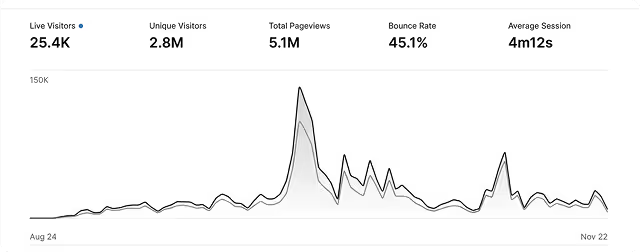


The simplest way we’ve found to grow traffic from Google and LLMs is to publish blog posts every day. @rankzilla makes it incredibly easy to stay consistent with our content schedule.
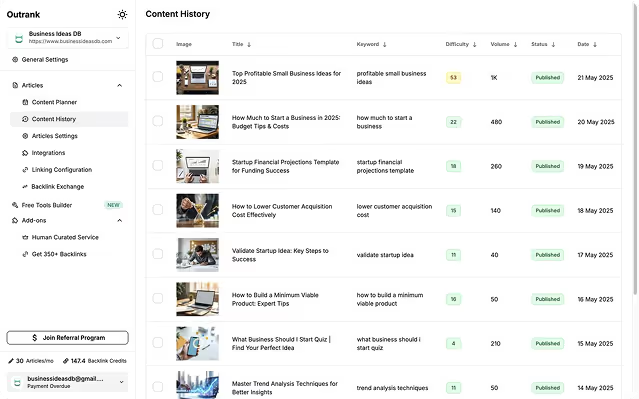
“An AI tool that improves SEO” sounded like another overhyped promise.
But we decided to give Rankzilla a shot.
Three months later, organic search has driven more than 4,600 visitors to our site. That’s a massive win for us.
Thanks to the @rankzilla team — this tool really delivers.
The simplest way we’ve found to grow traffic from Google and LLMs is to publish blog posts every day. @rankzilla makes it incredibly easy to stay consistent with our content schedule.
“An AI tool that improves SEO” sounded like another overhyped promise.
But we decided to give Rankzilla a shot.
Three months later, organic search has driven more than 4,600 visitors to our site. That’s a massive win for us.
Thanks to the @rankzilla team — this tool really delivers.
The simplest way we’ve found to grow traffic from Google and LLMs is to publish blog posts every day. @rankzilla makes it incredibly easy to stay consistent with our content schedule.

Huge win for us — thanks, rankzilla!🎉

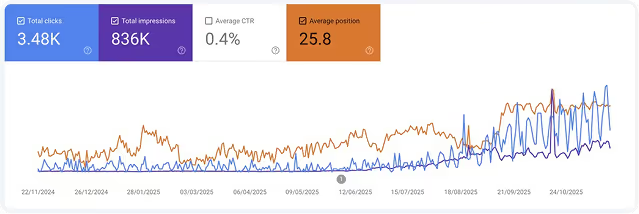

📈 Organic traffic is up 55%
🔍 We’re ranking on the first page for 8 new keywords
💪 Our DR went from 21 to 31
The built‑in content ideas and backlink exchange save me hours every week. @rankzilla has become a core part of my workflow.
Huge win for us — thanks, rankzilla!🎉
📈 Organic traffic is up 55%
🔍 We’re ranking on the first page for 8 new keywords
💪 Our DR went from 21 to 31
The built‑in content ideas and backlink exchange save me hours every week. @rankzilla has become a core part of my workflow.
Huge win for us — thanks, rankzilla!🎉
📈 Organic traffic is up 55%
🔍 We’re ranking on the first page for 8 new keywords
💪 Our DR went from 21 to 31
The built‑in content ideas and backlink exchange save me hours every week. @rankzilla has become a core part of my workflow.

They’ve built a solid product: onboarding is smooth, and I had everything up and running in under 10 minutes.
The backlink exchange alone is worth way more than what I’m paying — and I haven’t had to submit my site to a single directory yet.

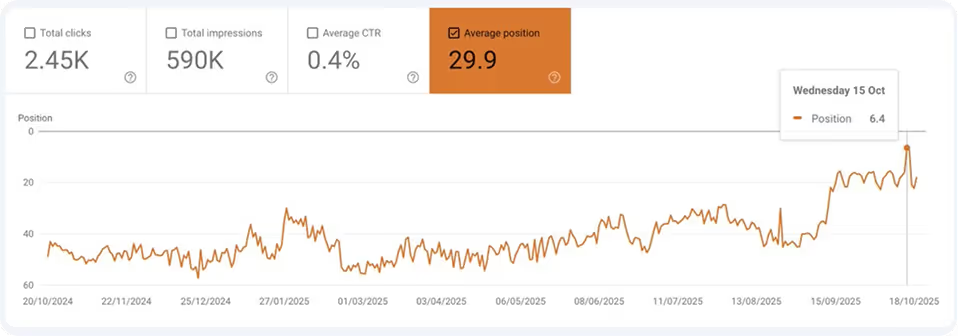

🚀 Search impressions tripled
📊 Click‑through rate improved from 0.3% to 0.9%
💼 We’re getting a steady stream of signups from organic search
They’ve built a solid product: onboarding is smooth, and I had everything up and running in under 10 minutes.
The backlink exchange alone is worth way more than what I’m paying — and I haven’t had to submit my site to a single directory yet.
🚀 Search impressions tripled
📊 Click‑through rate improved from 0.3% to 0.9%
💼 We’re getting a steady stream of signups from organic search
They’ve built a solid product: onboarding is smooth, and I had everything up and running in under 10 minutes.
The backlink exchange alone is worth way more than what I’m paying — and I haven’t had to submit my site to a single directory yet.
🚀 Search impressions tripled
📊 Click‑through rate improved from 0.3% to 0.9%
💼 We’re getting a steady stream of signups from organic search
Grow Organic Traffic on Auto-Pilot
Rankzilla boosts your SEO rankings and organic traffic so you can concentrate on growing your business.

What's included:

Frequently asked questions
How does the article automation work?
First, you define your website details, target audience, and content style. After that, Rankzilla runs on autopilot, creating one high-quality article every day. Each piece is written with SEO in mind, includes relevant visuals, and reads in a natural, human-like voice. Once everything is configured, the system keeps your site supplied with consistent, fresh content.
Will the content be SEO-friendly?
Yes. All articles are built for SEO from the ground up:
Optimized titles and meta descriptions
• Naturally integrated keywords
• Clear heading structure (H2, H3)
• In-depth articles (typically 1,200–1,700 words)
Rankzilla also supports internal links and can add external references to strengthen your SEO performance.
Can I manage multiple websites with your service?
Yes. Each site gets its own configuration, including audience settings and content preferences, and receives up to 30 articles per month. We also offer tiered discounts for managing multiple sites:
• 2–4 websites: 10% off your total subscription
• 5–19 websites: 15% off your total subscription
• 20+ websites: 20% off your total subscription
The discount is applied to your entire plan, so your savings grow with every additional website.
What integrations do you support?
Rankzilla connects with many popular platforms:
• WordPress
• WordPress.com
• Webflow
• Notion
• Wix
• Shopify
• API (custom webhook)
Articles can be published automatically, fully formatted for each platform. You can link multiple sites and tools, then manage everything from a single, centralized dashboard.
Does it support other languages?
Yes. You can choose your desired language in the settings, and Rankzilla will generate content in that language. The system focuses on natural, fluent writing while following proper grammar and style rules for the selected language.
How often are new articles generated?
Rankzilla can create one optimized article per day, up to 30 articles per month. Each piece is quality-checked before it’s ready to go live. During the trial period, articles may include a Rankzilla watermark; paid plans deliver clean, unbranded content.
Can I review articles before publication?
Yes. By default, new articles are saved as drafts in your connected platform (such as WordPress or Webflow). You can review, adjust, or rewrite any part of the content in the editor you already use. Once it meets your standards, you simply hit publish.